How to Set Up Your myQ Smart Garage Door Opener (Step-by-Step)
Step-by-step guide to setting up LiftMaster myQ Wi-Fi on your garage door opener. Control your garage from your phone anywhere.
Eddie
January 8, 2026
+garage+door+Arizona)
Our daily service calls at Green Valley Garage Door Repair often involve frustrated homeowners staring at a blinking router in a sweltering garage. The intense heat in southern Arizona makes setting up electronics surprisingly difficult. We know exactly how to bypass these common regional hurdles.
Getting your smart home connected should not feel like an uphill battle.
Our team put together this guide to clarify the exact process. Learning How to Set Up Your myQ Smart Garage Door Opener (Step-by-Step) takes just a few minutes when you have the right preparation.
We see these issues constantly, so we rely on proven methods. Let’s look at the data, what it actually means for your hardware, and walk through the exact installation steps.
Key Takeaways
We always start our consultations by highlighting a few critical facts. Local conditions dictate how your hardware performs over time.
- Our technicians exclusively install LiftMaster openers and Clopay doors because they endure harsh conditions. LiftMaster units feature built-in myQ technology.
- Uninsulated garages in our area frequently reach 130°F to 150°F during the summer. We constantly replace melted electronics from lesser brands.
- The myQ system requires a 2.4 GHz network to function properly. We find that a simple phone test prevents hours of troubleshooting.
- Annual professional inspections catch issues before they turn into emergencies. Our team recommends scheduling these checks every spring.
What Green Valley Homeowners Should Know
Our service area covers Green Valley, Sahuarita, Tubac, Rio Rico, and Vail. Living in southern Arizona means your garage door faces unique challenges every single day. We see the toll that Sonoran Desert dust, intense UV exposure, and monsoon moisture take on mechanical systems.
Daily temperature swings also cause metal components to expand and contract rapidly. Our founder, Eddie, has been serving local homeowners for over 10 years and understands these specific environmental factors.
myQ Device Temperature Tolerances
Most standard smart devices simply fail when exposed to a 130°F environment. We stock our trucks with parts designed specifically for this climate.
The myQ Smart Garage Control is rated to operate in temperatures up to 149°F. We appreciate this high heat tolerance because it prevents summer connection drops.
Our team created this quick reference guide to help you choose the right accessories. Placement matters when temperatures exceed normal limits.
| Device Type | Operating Temperature Range | Best Placement Location |
|---|---|---|
| myQ Smart Garage Control (Hub) | -4°F to 149°F | Ceiling or high side wall |
| myQ Video Keypad | -4°F to 122°F | Exterior frame (shaded area preferred) |
| myQ Indoor Camera | -4°F to 122°F | Inside garage (away from direct sunlight) |
We constantly field questions about whether the video keypad will survive a Tucson summer. Mounting it in a shaded spot keeps it well within that 122°F threshold.
How to Set Up Your myQ Smart Garage Door Opener (Step-by-Step)
Our experts recommend grabbing your smartphone and standing right next to your motor before beginning. The entire process usually takes less than fifteen minutes.
Step 1: Verify Your 2.4 GHz Wi-Fi Signal
We fix countless setup failures that simply stem from a weak internet connection. Stucco walls and thick desert insulation notoriously block Wi-Fi signals. Our advice is to test the signal strength by playing a high-definition video on your phone while standing in the garage.
A buffering video indicates you might need a Wi-Fi extender. We also want to emphasize that myQ requires a 2.4 GHz network.
- Check your phone’s Wi-Fi settings menu.
- Ensure you are connected to the 2.4 GHz band, not the 5 GHz band.
- Verify you have at least two bars of signal strength.
Step 2: Download the App and Create an Account
Our first practical step involves getting the software ready. Search for the free myQ app in the Apple App Store or Google Play Store.
We suggest creating your account and verifying your email address before installing any hardware. This simple sequence prevents timing out while standing on a ladder.
Step 3: Mount the Door Sensor
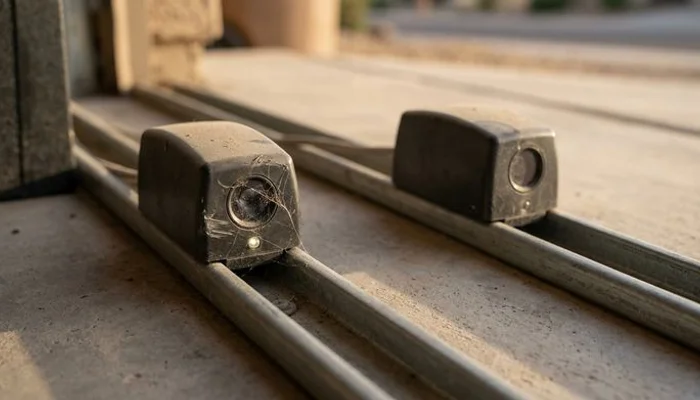
We find that the sensor placement is a common stumbling block. The door sensor communicates with the hub to indicate if the door is open or closed. Our preferred method involves using the included hook and loop adhesive strips.
Pro Tip: Fasten the sensor to a clean, dry area on the top inside panel of your garage door. We always make sure the word “Top” printed on the sensor is actually pointing upward. Installing it upside down will cause false alerts.
Step 4: Pair the Hub and Opener
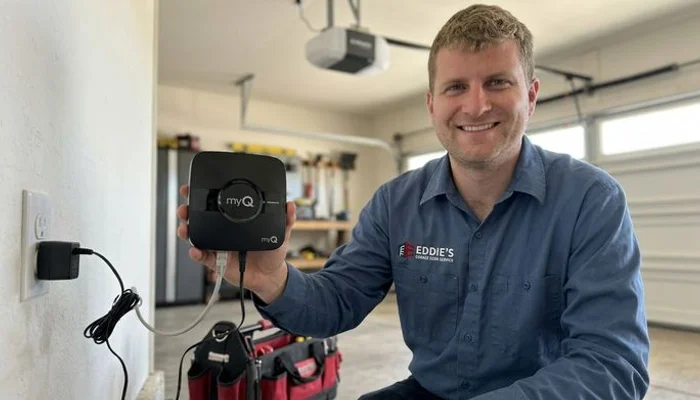
Our favorite part of the setup is pairing the system. Plug the myQ hub into the ceiling outlet near your opener. We instruct clients to watch for a blinking blue light on the hub.
Open the app, tap the plus sign, and follow the prompts to connect the hub to your home network. We love how the app then guides you to press the “Learn” button on your specific garage door motor. The system works seamlessly with most brands manufactured after 1993 that use standard safety sensors.
When to Call a Professional
Our company always encourages homeowners to handle digital setups, but physical repairs demand caution. Basic maintenance tasks like visual inspections and wiping down tracks are perfectly safe. We draw a strict line at anything involving springs, cables, or a door coming off its tracks.
These heavy metal components remain under extreme tension and can cause catastrophic injury. Our technicians get calls every week from residents who attempted a DIY spring replacement. A snapped torsion spring can exert hundreds of pounds of force in a split second.
We want you to stay safe above all else. If you are unsure whether your situation requires professional help, call Eddie for advice.
Need professional guidance? Call (520) 965-8259. We will give you an honest answer immediately. If it turns out to be something you can handle yourself, our staff will gladly tell you that too.
Eddie’s Recommendation for Southern Arizona Homes
Our decade of experience in the Green Valley area proves that proactive maintenance wins every time. Knowing How to Set Up Your myQ Smart Garage Door Opener (Step-by-Step) adds incredible convenience, but the physical door still needs attention. We strongly recommend scheduling annual inspections and timely garage door opener installation or replacement services.
Proper weatherproofing and fresh lubricants can extend the life of your entire system by years. We want to help you avoid those costly emergency repairs. Call (520) 965-8259 for a free consultation or to schedule a service visit today.
Eddie
Owner & Lead Technician
Eddie is the owner and lead technician at Green Valley Garage Door Repair, serving southern Arizona homeowners for over 10 years. He holds Arizona ROC License 358843 and is an exclusive installer of LiftMaster openers and Clopay garage doors.
Learn more about this service →